那個手感FU實在是太好了.......剛好G500又在特價 ....一個恍神我手上就多了一盒滑鼠了...
外盒...
![[開箱] 羅技 G500 ....](http://attach.mobile01.com/attach/200911/mobile01-0d14765e3e2aabfb9898ac8a10aaed6b.jpg)
![[開箱] 羅技 G500 ....](http://attach.mobile01.com/attach/200911/mobile01-b4e1812825e9d564a4c59214375f5d34.jpg)
所有配件 ....
可能是為了環保吧..說明書那袋並沒有附光碟...
鐵製的法碼盒感覺很有質感!!
![[開箱] 羅技 G500 ....](http://attach.mobile01.com/attach/200911/mobile01-9a59f6c601f58b5fb14d0d21784557a1.jpg)
USB...
![[開箱] 羅技 G500 ....](http://attach.mobile01.com/attach/200911/mobile01-34925e1a6fa8b0b6b4d76cefa7a0e099.jpg)
看起來黃黃的...是光線的關係
 實際上他是白鐵色的= ="
![[開箱] 羅技 G500 ....](http://attach.mobile01.com/attach/200911/mobile01-a386742125f17550c0957d6d287064f8.jpg)
背面 紅色格子是增重盤入口
![[開箱] 羅技 G500 ....](http://attach.mobile01.com/attach/200911/mobile01-9cf298953b0c527082a9889956c4a1f1.jpg)
側面 3個按鈕
![[開箱] 羅技 G500 ....](http://attach.mobile01.com/attach/200911/mobile01-127d9f21d7e8d77708d79fe4b4bf8a11.jpg)
正面 旁邊是DPI +- 有三段 可以用羅技的軟體調整每段不同的DPI X Y軸DPI也可分開設定
滾輪後方的按鈕是切換滾輪 有段/無段設定
有段的預設 轉起來不太順手 用羅技的軟體可調整到自己覺得最好的感覺(我是把垂直捲動調到5)
滾輪可左右推 各是一個按鍵 可用軟體設定...
前方看起來像是被燒過有點黃黑的痕跡 那個應該是原本的配色....
![[開箱] 羅技 G500 ....](http://attach.mobile01.com/attach/200911/mobile01-b4d21bf65b30aaa4a29cc6c8e8b6adf2.jpg)
中間跟尾巴各有一塊煙薰色...
![[開箱] 羅技 G500 ....](http://attach.mobile01.com/attach/200911/mobile01-afcc8d64b18208de267bc27db288275b.jpg)
通電之後會亮紅燈 是DPI顯示 總共有5段 下方那個躍動的小人是恆亮..
![[開箱] 羅技 G500 ....](http://attach.mobile01.com/attach/200911/mobile01-8cebef5f8140a70f9a8afba5b756376e.jpg)
法碼盒共12顆...
![[開箱] 羅技 G500 ....](http://attach.mobile01.com/attach/200911/mobile01-5e740ff4898431bef05ad770ea9dcaf9.jpg)
其實滑鼠本身已經很重了...我是把空盤塞進滑鼠防塵...
4.5g的每顆邊緣看起來都髒髒的摳不掉...不知道是不是已經生鏽了...
![[開箱] 羅技 G500 ....](http://attach.mobile01.com/attach/200911/mobile01-5d791832571b205fecd4b2e94bf4da13.jpg)
準備上機~~!!

線非常的夠長!! ... 夠繞過我兩個22吋螢幕然後拉到桌下插主機背後的USB port
![[開箱] 羅技 G500 ....](http://attach.mobile01.com/attach/200911/mobile01-0630f09314159e7de5adadd45a56f3eb.jpg)
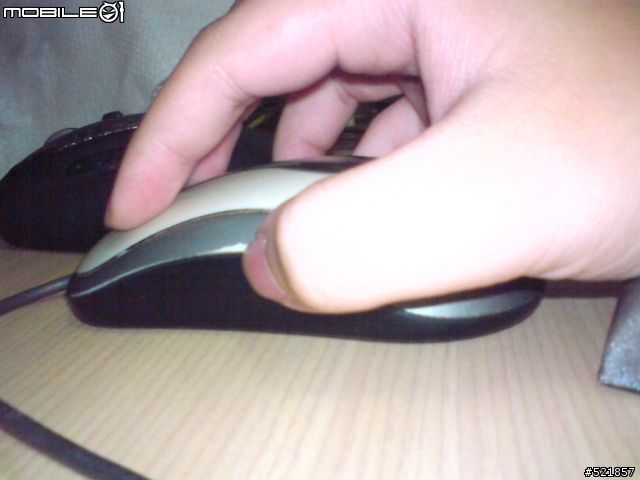
這個手感實在是讓我太陶醉了

![[開箱] 羅技 G500 ....](http://attach.mobile01.com/attach/200911/mobile01-ba2b5d60dd1c4844d8ef776cf8c20888.jpg)
準備退役的前輩.... CM-308
這隻很輕 而且移動起來不是很順 都被我抓起來用甩的
 ...
...而且線很短
 ....
....![[開箱] 羅技 G500 ....](http://attach.mobile01.com/attach/200911/mobile01-3c39723e1d363297258d7fe7c139bd81.jpg)
而且還按到掉漆了
....![[開箱] 羅技 G500 ....](http://attach.mobile01.com/attach/200911/mobile01-5e164979872df37430adef9c9edd84da.jpg)
傳統(?)
CM-308:小朋友~ 未來世界和平就靠你啦...
![[開箱] 羅技 G500 ....](http://attach.mobile01.com/attach/200911/mobile01-b004638b432501a395081094453b4d79.jpg)
G500:前....前輩... 好像有奇怪的東西混進來了.....
![[開箱] 羅技 G500 ....](http://attach.mobile01.com/attach/200911/mobile01-7ead7c44ab94ee6436f0ab3bbada9643.jpg)
G500插上電腦就可以直接用了....只是需要調整其他設定的話需要到羅技官網下載軟體
DPI可以拉到5700...游標會處於飛行模式... 隨便動一下就噴出去了= =
滾輪用無段模式會不小心滾過頭....
像是這篇 所有圖片打開 無段只要滾2次就到底了...