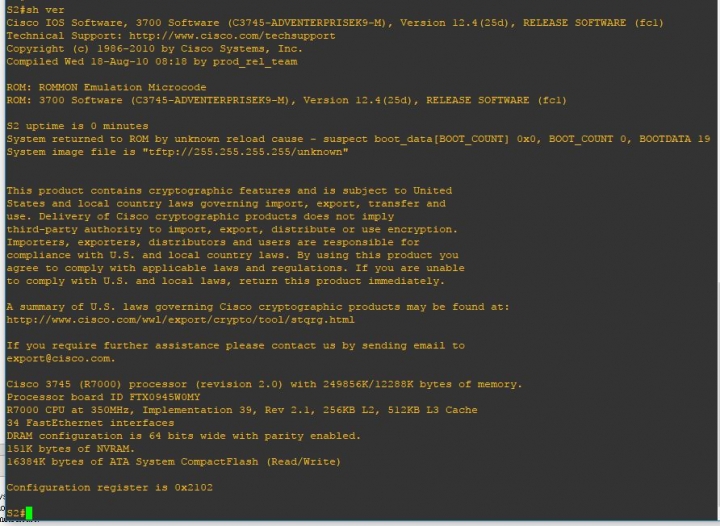
我在GNS3上練習vlan 的lab,但發生交換機與交換機之間trank線路無法互ping
這三台交換機是路由器裝L2 switch模組模擬出來的,trank 線路連接是l2 swutch
介面乙太網對連的,ip目前都是綁在vlan id上面的,請熟cisco網路設備大大看
一下我是哪邊設定錯誤了
附上架構圖及設定檔


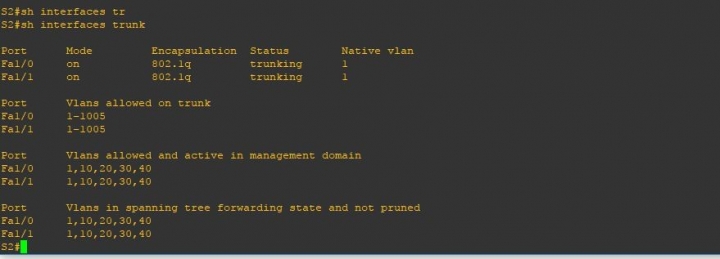
每一台run-start 設定
S1 設定部份
S1#sh running-config
Building configuration...
Current configuration : 1428 bytes
!
version 12.4
service timestamps debug datetime msec
service timestamps log datetime msec
no service password-encryption
!
hostname S1
!
boot-start-marker
boot-end-marker
!
!
no aaa new-model
no ip icmp rate-limit unreachable
ip cef
!
!
!
!
no ip domain lookup
ip auth-proxy max-nodata-conns 3
ip admission max-nodata-conns 3
!
!
ip tcp synwait-time 5
!
!
interface Ethernet0/0
no ip address
shutdown
half-duplex
!
interface FastEthernet1/0
switchport access vlan 10
switchport mode trunk
!
interface FastEthernet1/1
!
interface FastEthernet1/2
!
interface FastEthernet1/3
!
interface FastEthernet1/4
!
interface FastEthernet1/5
!
interface FastEthernet1/6
!
interface FastEthernet1/7
!
interface FastEthernet1/8
!
interface FastEthernet1/9
!
interface FastEthernet1/10
!
interface FastEthernet1/11
!
interface FastEthernet1/12
!
interface FastEthernet1/13
!
interface FastEthernet1/14
!
interface FastEthernet1/15
switchport access vlan 10
!
interface Vlan1
no ip address
!
interface Vlan10
ip address 10.10.10.253 255.255.255.0
!
ip forward-protocol nd
ip route 0.0.0.0 0.0.0.0 10.10.10.254
!
!
no ip http server
no ip http secure-server
!
no cdp log mismatch duplex
!
!
control-plane
!
line con 0
exec-timeout 0 0
privilege level 15
logging synchronous
line aux 0
exec-timeout 0 0
privilege level 15
logging synchronous
line vty 0 4
login
!
!
end
S2 設定部份
S2#sh running-config
Building configuration...
Current configuration : 2090 bytes
!
version 12.4
service timestamps debug datetime msec
service timestamps log datetime msec
no service password-encryption
!
hostname S2
!
boot-start-marker
boot-end-marker
!
!
no aaa new-model
memory-size iomem 5
no ip icmp rate-limit unreachable
ip cef
!
!
no ip domain lookup
ip auth-proxy max-nodata-conns 3
ip admission max-nodata-conns 3
!
ip tcp synwait-time 5
!
!
interface FastEthernet0/0
no ip address
shutdown
duplex auto
speed auto
!
interface FastEthernet0/1
no ip address
shutdown
duplex auto
speed auto
!
interface FastEthernet1/0
switchport access vlan 10
switchport mode trunk
!
interface FastEthernet1/1
switchport access vlan 20
switchport mode trunk
!
interface FastEthernet1/2
!
interface FastEthernet1/3
!
interface FastEthernet1/4
!
interface FastEthernet1/5
!
interface FastEthernet1/6
!
interface FastEthernet1/7
!
interface FastEthernet1/8
!
interface FastEthernet1/9
!
interface FastEthernet1/10
!
interface FastEthernet1/11
!
interface FastEthernet1/12
!
interface FastEthernet1/13
!
interface FastEthernet1/14
!
interface FastEthernet1/15
!
interface FastEthernet2/0
!
interface FastEthernet2/1
!
interface FastEthernet2/2
!
interface FastEthernet2/3
!
interface FastEthernet2/4
!
interface FastEthernet2/5
!
interface FastEthernet2/6
!
interface FastEthernet2/7
!
interface FastEthernet2/8
!
interface FastEthernet2/9
!
interface FastEthernet2/10
!
interface FastEthernet2/11
!
interface FastEthernet2/12
!
interface FastEthernet2/13
!
interface FastEthernet2/14
!
interface FastEthernet2/15
!
interface Vlan1
no ip address
!
interface Vlan10
ip address 10.10.10.254 255.255.255.0
!
interface Vlan20
ip address 10.10.20.254 255.255.255.0
vlan-id dot1q 20
exit-vlan-config
!
ip forward-protocol nd
!
!
no ip http server
no ip http secure-server
!
no cdp log mismatch duplex
no cdp run
!
!
control-plane
!
!
line con 0
exec-timeout 0 0
privilege level 15
logging synchronous
line aux 0
exec-timeout 0 0
privilege level 15
logging synchronous
line vty 0 4
login
!
!
end
S2 show ip route 設定部份
S2#sh ip route
Codes: C - connected, S - static, R - RIP, M - mobile, B - BGP
D - EIGRP, EX - EIGRP external, O - OSPF, IA - OSPF inter area
N1 - OSPF NSSA external type 1, N2 - OSPF NSSA external type 2
E1 - OSPF external type 1, E2 - OSPF external type 2
i - IS-IS, su - IS-IS summary, L1 - IS-IS level-1, L2 - IS-IS level-2
ia - IS-IS inter area, * - candidate default, U - per-user static route
o - ODR, P - periodic downloaded static route
Gateway of last resort is not set
10.0.0.0/24 is subnetted, 2 subnets
C 10.10.10.0 is directly connected, Vlan10
C 10.10.20.0 is directly connected, Vlan20
S2#
S3 設定部份
S3#sh running-config
Building configuration...
Current configuration : 1439 bytes
!
version 12.4
service timestamps debug datetime msec
service timestamps log datetime msec
no service password-encryption
!
hostname S3
!
boot-start-marker
boot-end-marker
!
!
no aaa new-model
no ip icmp rate-limit unreachable
ip cef
!
!
no ip domain lookup
ip auth-proxy max-nodata-conns 3
ip admission max-nodata-conns 3
!
!
ip tcp synwait-time 5
!
!
interface Ethernet0/0
no ip address
shutdown
half-duplex
!
interface FastEthernet1/0
switchport access vlan 20
switchport mode trunk
!
interface FastEthernet1/1
!
interface FastEthernet1/2
!
interface FastEthernet1/3
!
interface FastEthernet1/4
!
interface FastEthernet1/5
!
interface FastEthernet1/6
!
interface FastEthernet1/7
!
interface FastEthernet1/8
!
interface FastEthernet1/9
!
interface FastEthernet1/10
!
interface FastEthernet1/11
!
interface FastEthernet1/12
!
interface FastEthernet1/13
!
interface FastEthernet1/14
!
interface FastEthernet1/15
switchport access vlan 20
!
interface Vlan1
no ip address
!
interface Vlan20
ip address 10.10.20.253 255.255.255.0
!
ip forward-protocol nd
ip route 0.0.0.0 0.0.0.0 10.10.20.254
!
!
no ip http server
no ip http secure-server
!
no cdp log mismatch duplex
no cdp run
!
!
control-plane
!
!
line con 0
exec-timeout 0 0
privilege level 15
logging synchronous
line aux 0
exec-timeout 0 0
privilege level 15
logging synchronous
line vty 0 4
login
!
!
end