

HKBN FTTH GPON
LaWrENce^^ wrote:
tcping


HKBN FTTH 1G/1G GPON
http://www.mobile01.com/topicdetail.php?f=507&t=2689002&p=3#35323337
Kenji.K wrote:
Gateway就免了...HKBN 的DNS吧~~~
xxx@router:~# ping 203.80.96.9
PING 203.80.96.9 (203.80.96.9): 56 data bytes
64 bytes from 203.80.96.9: seq=0 ttl=251 time=2.242 ms
64 bytes from 203.80.96.9: seq=1 ttl=251 time=1.952 ms
64 bytes from 203.80.96.9: seq=2 ttl=251 time=1.996 ms
64 bytes from 203.80.96.9: seq=3 ttl=251 time=1.863 ms
64 bytes from 203.80.96.9: seq=4 ttl=251 time=1.876 ms
64 bytes from 203.80.96.9: seq=5 ttl=251 time=1.675 ms
64 bytes from 203.80.96.9: seq=6 ttl=251 time=1.665 ms
64 bytes from 203.80.96.9: seq=7 ttl=251 time=1.583 ms
^C
--- 203.80.96.9 ping statistics ---
8 packets transmitted, 8 packets received, 0% packet loss
round-trip min/avg/max = 1.583/1.856/2.242 ms
PCCW FTTH GPON

威達FTT電線杆
http://www.mobile01.com/topicdetail.php?f=507&t=2048325&p=9#35240590
nhiteo wrote:
台中威達光纖10M/2M(Ethernet 供裝) + 無線網路(FON AP)
ping 威達自有dns server

http://www.mobile01.com/topicdetail.php?f=507&t=2888624&p=2#37859973
BSMI wrote:
台中威達100M
Ping 威達雲端 203.217.96.2

http://www.mobile01.com/topicdetail.php?f=507&t=1758988&p=7#22448233
mwidhat wrote:
台固也有FTTH..
我家最少50年的透天屋
還不是上傳2M這種喔,是雙向20M

http://www.mobile01.com/topicdetail.php?f=507&t=2553617&p=4#36981071
irs wrote:
操弄設備影響結果去製造疑慮和藉口, 不就正是"這種公司"想要的嗎? 而這又能說什麼呢?
IX的問題搞了多久才讓"這種公司"稍微讓步, 多幫"這種公司"製造藉口只會產生反效果.
(China Telecom , FTTH, Triple-play, WL-520GC.)
網路是不怎麼樣, 也不知道小區裡有多少人在看電視, 但起碼不需要用戶哭著求他們才能到這種水準.

http://www.mobile01.com/topicdetail.php?f=507&t=2878687&p=5#37655012
chrisintaipei wrote:
參考下,上海家裡 FTTH - 這是便宜的家用線喔,不是辦公室的企業線:
最近一個小時:
最近一個月:
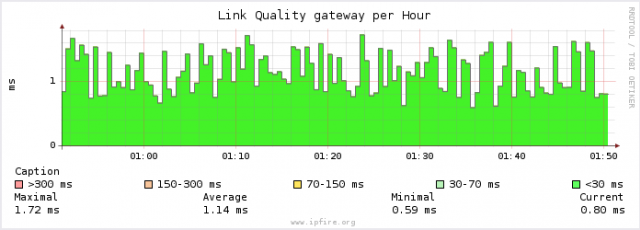
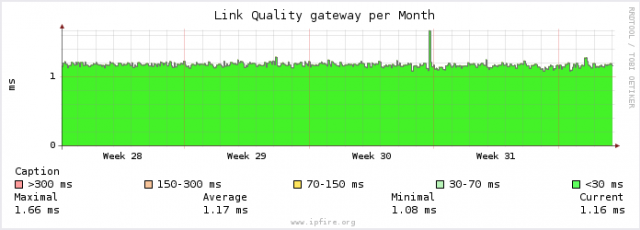
http://www.mobile01.com/topicdetail.php?f=507&t=2878687
shi7860 wrote:
但是ping中華的DNS(168.95.1.1)顯示出來的ping值是2~10亂數再跳 無法很穩定
這真的是FTTH該有的ping嗎?

http://www.mobile01.com/topicdetail.php?f=507&t=2689002
jerry115652001 wrote:
我之前ping都在3-4之間
現在勒

http://www.mobile01.com/topicdetail.php?f=507&t=2947565&p=2#38626533
sae wrote:
ping機房168.95.1.1回應時間不穩定
光纖龜型號 FTE6086

http://www.mobile01.com/topicdetail.php?f=507&t=2689002&p=2#35220233
franklin0311 wrote:
數值卻是從17~10ms左右在跳
怎麼看不到當初想像的1或2、3ms咧?

http://www.mobile01.com/topicdetail.php?f=507&t=2048325&p=3#26408201
wei001003 wrote:
ping比我的好太多了
我的也是FTTH,工程人員說12左右都算正常
還說這樣很快了
還是他們是呼攏我?

http://www.mobile01.com/topicdetail.php?f=507&t=2048325
coolbrother wrote:

http://blog.xuite.net/chipinwu/blog/63398190
http://www.mobile01.com/topicdetail.php?f=507&t=2154310&p=60#39835721
chipinwu wrote:
我申請的FTTH一開始ping值也不是很好一直亂跳5~13ms之間,與01上大大們的狀況差不多

http://www.mobile01.com/topicdetail.php?f=507&t=1758988&p=7#22448279
四小昕 wrote:

http://www.mobile01.com/topicdetail.php?f=507&t=2157386#27930203
大北門 wrote:
你的是假光纖,偶滴才是真光纖

http://www.mobile01.com/topicdetail.php?f=507&t=2157386
神來一比 wrote:
我家今天裝了光纖到府
測試中華電信的IP延遲是15
但是用SPEEDTEST卻是26
這樣正常嗎??
http://www.mobile01.com/topicdetail.php?f=507&t=2837695&p=5#37124908
http://www.mobile01.com/topicdetail.php?f=507&t=2816513&p=2#36839343
momoisacow wrote:
168.95.1.1 的 Ping 統計資料:
封包: 已傳送 = 1428,已收到 = 1428, 已遺失 = 0 (0% 遺失),
大約的來回時間 (毫秒):
最小值 = 1ms,最大值 = 9ms,平均 = 4ms
有進步耶 我三月裝 四月多那時候測 平均15ms
這個目前FTTH是悲劇 我的ping...爛爆了 這不該是光纖表現 不是個位數在波動
當初看中華牽光纖、熔接光纖,免費(?)把環境弄成FTTH感覺很爽...結果ping表現也跟ADSL差不多...只有少數人ping是 3、4 之間而已
http://www.mobile01.com/topicdetail.php?f=507&t=2974088
winsonic14 wrote:
施工師父給這台小烏龜 FTTH EPON FTE6086
PING值2MS~10MS亂跳很不穩
http://www.mobile01.com/topicdetail.php?f=507&t=2154310&p=22#33479626
wsctw wrote:
FTTH
1.34.*.*
追蹤 dns.hinet.net [168.95.1.1] 的路由:
1 <1 ms <1 ms <1 ms 192.168.1.1
2 10 ms 6 ms 7 ms h254.s98.ts.hinet.net [168.95.98.254]
3 4 ms 7 ms 7 ms tp-pc1-c76r1.router.hinet.net [168.95.74.10]
4 2 ms 8 ms 7 ms PCPC-3202.hinet.net [220.128.11.90]
5 8 ms 7 ms 7 ms TPDT-3012.hinet.net [220.128.11.58]
6 4 ms 7 ms 7 ms TPDB-3102.hinet.net [220.128.4.193]
7 9 ms 6 ms 10 ms 210-59-204-189.HINET-IP.hinet.net [210.59.204.189]
8 5 ms 7 ms 8 ms dns.hinet.net [168.95.1.1]
追蹤完成。
Ping 168.95.1.1 (使用 32 位元組的資料):
回覆自 168.95.1.1: 位元組=32 時間=8ms TTL=247
回覆自 168.95.1.1: 位元組=32 時間=6ms TTL=247
回覆自 168.95.1.1: 位元組=32 時間=5ms TTL=247
回覆自 168.95.1.1: 位元組=32 時間=4ms TTL=247
168.95.1.1 的 Ping 統計資料:
封包: 已傳送 = 4,已收到 = 4, 已遺失 = 0 (0% 遺失),
大約的來回時間 (毫秒):
最小值 = 4ms,最大值 = 8ms,平均 = 5ms
http://www.mobile01.com/topicdetail.php?f=507&t=2918786#38155241
mikecool wrote:
我的是 seednet 100/20 FTTH
問題2
也跟你一樣,但是比你跳的還大
我是1~10之間在跳,完全穩不下來
幫我安裝的師傅說我是本區第一位裝的(北市中行里)
他也是第一次裝,也不知道為什麼PING會跳成這樣
HiNet FTTH EPON 非固定制 100M/100M
FTE6086
跳啊跳啊...跳得好開心啊


TCP Ping


TP-Link 741ND韌體的ping
Pinging 168.95.1.1 with 64 bytes of data:
Reply from 168.95.1.1: bytes=64 time=8 TTL=250 seq=1
Reply from 168.95.1.1: bytes=64 time=2 TTL=250 seq=2
Reply from 168.95.1.1: bytes=64 time=4 TTL=250 seq=3
Reply from 168.95.1.1: bytes=64 time=4 TTL=250 seq=4
Reply from 168.95.1.1: bytes=64 time=4 TTL=250 seq=5
Reply from 168.95.1.1: bytes=64 time=7 TTL=250 seq=6
Reply from 168.95.1.1: bytes=64 time=3 TTL=250 seq=7
Reply from 168.95.1.1: bytes=64 time=6 TTL=250 seq=8
Reply from 168.95.1.1: bytes=64 time=6 TTL=250 seq=9
Reply from 168.95.1.1: bytes=64 time=6 TTL=250 seq=10
Reply from 168.95.1.1: bytes=64 time=5 TTL=250 seq=11
Reply from 168.95.1.1: bytes=64 time=5 TTL=250 seq=12
Reply from 168.95.1.1: bytes=64 time=5 TTL=250 seq=13
Reply from 168.95.1.1: bytes=64 time=5 TTL=250 seq=14
Reply from 168.95.1.1: bytes=64 time=4 TTL=250 seq=15
Reply from 168.95.1.1: bytes=64 time=2 TTL=250 seq=16
Reply from 168.95.1.1: bytes=64 time=3 TTL=250 seq=17
Reply from 168.95.1.1: bytes=64 time=5 TTL=250 seq=18
Reply from 168.95.1.1: bytes=64 time=4 TTL=250 seq=19
Reply from 168.95.1.1: bytes=64 time=4 TTL=250 seq=20
Reply from 168.95.1.1: bytes=64 time=8 TTL=250 seq=21
Reply from 168.95.1.1: bytes=64 time=3 TTL=250 seq=22
Reply from 168.95.1.1: bytes=64 time=4 TTL=250 seq=23
Reply from 168.95.1.1: bytes=64 time=4 TTL=250 seq=24
Reply from 168.95.1.1: bytes=64 time=3 TTL=250 seq=25
Reply from 168.95.1.1: bytes=64 time=2 TTL=250 seq=26
Reply from 168.95.1.1: bytes=64 time=4 TTL=250 seq=27
Reply from 168.95.1.1: bytes=64 time=4 TTL=250 seq=28
Reply from 168.95.1.1: bytes=64 time=4 TTL=250 seq=29
Reply from 168.95.1.1: bytes=64 time=6 TTL=250 seq=30
Reply from 168.95.1.1: bytes=64 time=3 TTL=250 seq=31
Reply from 168.95.1.1: bytes=64 time=4 TTL=250 seq=32
Reply from 168.95.1.1: bytes=64 time=4 TTL=250 seq=33
Reply from 168.95.1.1: bytes=64 time=3 TTL=250 seq=34
Reply from 168.95.1.1: bytes=64 time=7 TTL=250 seq=35
Reply from 168.95.1.1: bytes=64 time=4 TTL=250 seq=36
Reply from 168.95.1.1: bytes=64 time=4 TTL=250 seq=37
Reply from 168.95.1.1: bytes=64 time=4 TTL=250 seq=38
Reply from 168.95.1.1: bytes=64 time=2 TTL=250 seq=39
Reply from 168.95.1.1: bytes=64 time=3 TTL=250 seq=40
Reply from 168.95.1.1: bytes=64 time=3 TTL=250 seq=41
Reply from 168.95.1.1: bytes=64 time=3 TTL=250 seq=42
Reply from 168.95.1.1: bytes=64 time=3 TTL=250 seq=43
Reply from 168.95.1.1: bytes=64 time=7 TTL=250 seq=44
Reply from 168.95.1.1: bytes=64 time=5 TTL=250 seq=45
Reply from 168.95.1.1: bytes=64 time=1 TTL=250 seq=46
Reply from 168.95.1.1: bytes=64 time=3 TTL=250 seq=47
Reply from 168.95.1.1: bytes=64 time=9 TTL=250 seq=48
Reply from 168.95.1.1: bytes=64 time=6 TTL=250 seq=49
Reply from 168.95.1.1: bytes=64 time=5 TTL=250 seq=50
Ping statistics for 168.95.1.1
Packets: Sent = 50, Received = 50, Lost = 0 (0% loss),
Approximate round trip times in milliseconds:
Minimum = 1, Maximum = 9, Average = 4


TP-Link 741ND韌體的ping
Pinging 168.95.1.1 with 64 bytes of data:
Reply from 168.95.1.1: bytes=64 time=1 TTL=250 seq=1
Reply from 168.95.1.1: bytes=64 time=2 TTL=250 seq=2
Reply from 168.95.1.1: bytes=64 time=1 TTL=250 seq=3
Reply from 168.95.1.1: bytes=64 time=1 TTL=250 seq=4
Reply from 168.95.1.1: bytes=64 time=1 TTL=250 seq=5
Reply from 168.95.1.1: bytes=64 time=1 TTL=250 seq=6
Reply from 168.95.1.1: bytes=64 time=1 TTL=250 seq=7
Reply from 168.95.1.1: bytes=64 time=1 TTL=250 seq=8
Reply from 168.95.1.1: bytes=64 time=1 TTL=250 seq=9
Reply from 168.95.1.1: bytes=64 time=1 TTL=250 seq=10
Reply from 168.95.1.1: bytes=64 time=1 TTL=250 seq=11
Reply from 168.95.1.1: bytes=64 time=1 TTL=250 seq=12
Reply from 168.95.1.1: bytes=64 time=2 TTL=250 seq=13
Reply from 168.95.1.1: bytes=64 time=2 TTL=250 seq=14
Reply from 168.95.1.1: bytes=64 time=1 TTL=250 seq=15
Reply from 168.95.1.1: bytes=64 time=1 TTL=250 seq=16
Reply from 168.95.1.1: bytes=64 time=1 TTL=250 seq=17
Reply from 168.95.1.1: bytes=64 time=2 TTL=250 seq=18
Reply from 168.95.1.1: bytes=64 time=1 TTL=250 seq=19
Reply from 168.95.1.1: bytes=64 time=1 TTL=250 seq=20
Reply from 168.95.1.1: bytes=64 time=1 TTL=250 seq=21
Reply from 168.95.1.1: bytes=64 time=2 TTL=250 seq=22
Reply from 168.95.1.1: bytes=64 time=1 TTL=250 seq=23
Reply from 168.95.1.1: bytes=64 time=1 TTL=250 seq=24
Reply from 168.95.1.1: bytes=64 time=1 TTL=250 seq=25
Reply from 168.95.1.1: bytes=64 time=1 TTL=250 seq=26
Reply from 168.95.1.1: bytes=64 time=1 TTL=250 seq=27
Reply from 168.95.1.1: bytes=64 time=1 TTL=250 seq=28
Reply from 168.95.1.1: bytes=64 time=1 TTL=250 seq=29
Reply from 168.95.1.1: bytes=64 time=2 TTL=250 seq=30
Reply from 168.95.1.1: bytes=64 time=1 TTL=250 seq=31
Reply from 168.95.1.1: bytes=64 time=2 TTL=250 seq=32
Reply from 168.95.1.1: bytes=64 time=1 TTL=250 seq=33
Reply from 168.95.1.1: bytes=64 time=1 TTL=250 seq=34
Reply from 168.95.1.1: bytes=64 time=1 TTL=250 seq=35
Reply from 168.95.1.1: bytes=64 time=1 TTL=250 seq=36
Reply from 168.95.1.1: bytes=64 time=2 TTL=250 seq=37
Reply from 168.95.1.1: bytes=64 time=2 TTL=250 seq=38
Reply from 168.95.1.1: bytes=64 time=1 TTL=250 seq=39
Reply from 168.95.1.1: bytes=64 time=1 TTL=250 seq=40
Reply from 168.95.1.1: bytes=64 time=1 TTL=250 seq=41
Reply from 168.95.1.1: bytes=64 time=1 TTL=250 seq=42
Reply from 168.95.1.1: bytes=64 time=1 TTL=250 seq=43
Reply from 168.95.1.1: bytes=64 time=1 TTL=250 seq=44
Reply from 168.95.1.1: bytes=64 time=1 TTL=250 seq=45
Reply from 168.95.1.1: bytes=64 time=2 TTL=250 seq=46
Reply from 168.95.1.1: bytes=64 time=2 TTL=250 seq=47
Reply from 168.95.1.1: bytes=64 time=1 TTL=250 seq=48
Reply from 168.95.1.1: bytes=64 time=2 TTL=250 seq=49
Reply from 168.95.1.1: bytes=64 time=1 TTL=250 seq=50
Ping statistics for 168.95.1.1
Packets: Sent = 50, Received = 50, Lost = 0 (0% loss),
Approximate round trip times in milliseconds:
Minimum = 1, Maximum = 2, Average = 1


威達DNS


之前討論中華電信FTTH EPON/GPON ping的所有文章中只有這張圖是正解,其他的都是...
http://www.mobile01.com/topicdetail.php?f=507&t=2437770&p=2#31871911
四小昕 wrote:

註:我可沒有查修的MAC Address

http://www.mobile01.com/topicdetail.php?f=507&t=2918786#38166001
a78810 wrote:
Ping值會上下飄動是正常的,也是可以從機房改穩定,但是為維持在15ms左右
http://www.mobile01.com/topicdetail.php?f=507&t=2918786&p=2#38176472
miller-tai wrote:
真不知道底是誰開始教大家icmp reply在幾ms間跳動表示有問題?
那我這張不就要去死一死?
你ping遠端都有意見?那我這ping gateway不就????
請問那些喜歡鬼扯的人,如果我拿一台電腦插在6748GE-TX上ping vlan int還會跳,那表示?
可以請大家解釋一下嗎?

http://www.mobile01.com/topicdetail.php?f=507&t=2878687#37626456
FunnyCLUB wrote:
哪裡不正常了,PING不跳才不正常吧
http://www.mobile01.com/topicdetail.php?f=507&t=2878687&p=2#37633419
Algar wrote:
明明就很正常
就像跑高速公路
你今天跑到終點只要30分鐘 明天也一定是30分鐘嗎
線路又不是你獨享的
ping值不變你才要懷疑他是不是做假的
+- 10ms以內算變動很大喔?
http://www.mobile01.com/topicdetail.php?f=507&t=2878687&p=2#37633511
eadison.liu wrote:
原來ping值要不跳才算正常喔~~~
那我買的跑車~定速在高速公路上跑~跑的時間不一樣~那我該向車廠要求出保固了
真的是一大早就讓我~
http://www.mobile01.com/topicdetail.php?f=507&t=2878687&p=3#37638593
ilikegoodgod wrote:
就如同跑車一樣!
在全速兩百多公里的時候,
你發現這次的速度比上次快或慢0.3公里!
然後就把整台車送去車廠報修!
沒有人會這樣吧!
Ping低到一個程度,就感覺不太出來了!
沒必要報修吧!















