出現的速率,千奇百怪,想必這網頁的測速可信度不高。
我想自己的電腦網卡顯示出來的速率,可靠度絕對不輸任何網站所提供
的測試結果,因此,在下提供最準確的測速方法。
首先,打開"工作管理員",切換到"網路功能"此分頁,先等等,確認網
卡沒任何封包在跑。

其次,用ftp軟體或cmd底下執行ftp,連到自己所屬ISP提供的伺服器。
以我的網路所屬ISP為例,我所執行的command:
ftp> open ftp.adsl.hinet.net
Connected to ftp.adsl.hinet.net.
220 Welcome to HiNet Speed Test Server!
User (ftp.adsl.hinet.net:(none)): ftp
331 Please specify the password.
Password:
230 Login successful.
ftp> ls
200 PORT command successful. Consider using PASV.
150 Here comes the directory listing.
test_001m.zip
test_003m.zip
test_005m.zip
test_010m.zip
test_020m.zip
test_040m.zip
test_100m.zip
test_200m.zip
uploads
226 Directory send OK.
ftp: 129 bytes received in 0.00Seconds 129000.00Kbytes/sec.
ftp>get test_100m.zip
然後觀察在下載期間,你的網卡使用率,
我的網卡連線速率是100M,下載期間可以達到10%的使用率,
這就表示10Mbps確實可達到。
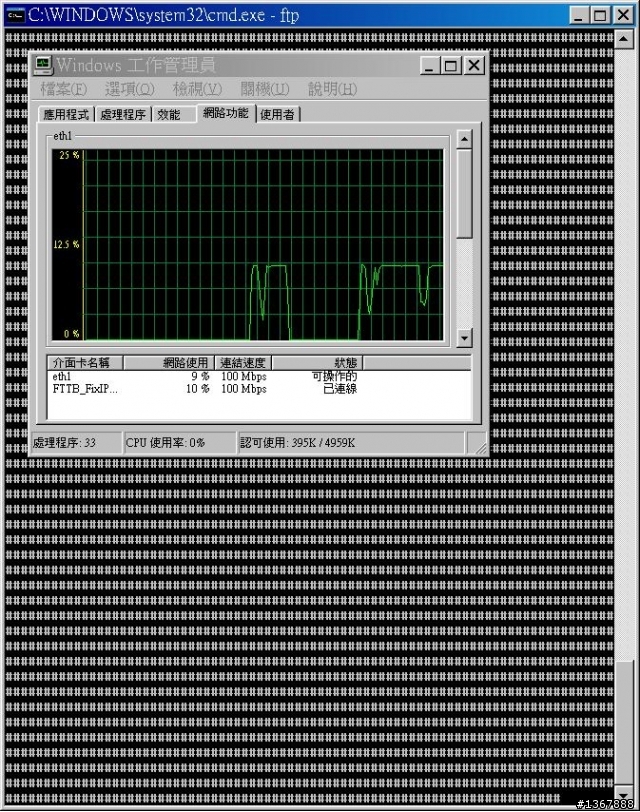
以下是下載完成的頁面:

對速率不足有疑慮的,你拿speedtest的測試速率來要求hinet,豈不是
跟拿明朝的劍來斬清朝的官一樣搞笑?