Synology DS3018xs 開箱- btrfs 自我修復功能實測
3rd party pcie ssd cache card
利用 Synology NAS 建立總部及分公司 VPN 連線
在產品的定位及適用環境, DS3018xs 我比較會建議在中小企業, 需要高速傳輸及群組檔案共享的環境, 甚至於希望在上面導入 VM(virtual Machine), 而 DS1618+ 同樣也支援 10G 網卡擴充, 同樣也支援 VMM, 但反而我會主推做為 file server 或是 Power User 使用.
價位上 DS1618+ 較 DS3018xs 便宜許多, 很多網友私訊詢問這兩款如何選擇?如果是企業用戶, 對於預算以及希望有更佳的保固及支援, 那麼 ds3018xs 是最好的選擇. 畢竟 plus 系列和 xs/xs+ 系列有很大的不同.
1.ds1618+ 提供三年保, ds3018xs 五年保.
2.ds3018xs 提供 SRS 五年保固及免運費換修服務, 這項服務很重要, 在機器故障的情況下, 提出申請於次個工作日, 原廠就會寄出替換機. 企業除了自身備份外, 有的會再購置備機, 對於預算沒有那麼充足的情況下, 可以購買 xs/xs+ 機種, 原廠在五年保固內皆能保證有備機可免費替換. (更多詳情)
3.ds1618+ 最大擴充至 16 顆硬碟, 而 ds3018xs 最大可擴充到 30 顆總量.
4.ds3018xs 提供 RAID F1 mode, 對於 SSD all flash 建置提供更高的保護.
所以 ds3018xs 所多出來的購機成本, 可以當做機器效能提升及購買更即時服務及保險的概念.
| DS1618+開箱 |


| 建議配置 |
DS1618+ 原廠配置 4GB DDR4 RAM, 這在一般做為 file server 使用已經相當足夠, 系統有兩個 ram socket, 最大可擴充至 32GB(16GB*2), 除非要跑 VM 等較耗系統資源程式, 不然一般是不需要再擴充.
另外本機可接六顆 2.5"/3.5" SSD or HDD, 現在市售 4/6/8/10TB 硬碟已經很常見, 單位價格也相當便宜了, 如果採用 10TB HDD*6 以 RAID6(or SHR2), 可用儲存空間大約也有40TB左右, 另外可利用串接 2 個 5 bay 擴充櫃達到最多 16 顆硬碟的總容量.
以下是以四顆 intel SSD 大致測試了 DS1618+ 內部儲存空間的讀寫速度.


大致上達到讀取 1300MB/s, 寫入約 600MB/s, 當做用的碟數愈多, 將會更增加整體的讀寫速度.
root@ds1618plus:/volume1/public# fio fio2.conf
read: (g=0): rw=read, bs=64K-64K/64K-64K/64K-64K, ioengine=libaio, iodepth=256
write: (g=1): rw=write, bs=64K-64K/64K-64K/64K-64K, ioengine=libaio, iodepth=256
fio-2.13
Starting 2 processes
Jobs: 1 (f=1): [_(1),W(1)] [100.0% done] [0KB/607.3MB/0KB /s] [0/9716/0 iops] [eta 00m:00s]
read: (groupid=0, jobs=1): err= 0: pid=10001: Wed Oct 31 08:19:01 2018
read : io=16384MB, bw=1302.5MB/s, iops=20839, runt= 12579msec
slat (usec): min=26, max=3993, avg=43.73, stdev=17.01
clat (usec): min=654, max=27386, avg=12228.49, stdev=953.47
lat (usec): min=702, max=27438, avg=12272.64, stdev=956.45
clat percentiles (usec):
| 1.00th=[10816], 5.00th=[11328], 10.00th=[11456], 20.00th=[11712],
| 30.00th=[11968], 40.00th=[12096], 50.00th=[12224], 60.00th=[12224],
| 70.00th=[12352], 80.00th=[12480], 90.00th=[12608], 95.00th=[13120],
| 99.00th=[16768], 99.50th=[17280], 99.90th=[20864], 99.95th=[21120],
| 99.99th=[22144]
bw (MB /s): min= 944, max= 1247, per=81.27%, avg=1058.53, stdev=54.53
lat (usec) : 750=0.01%, 1000=0.01%
lat (msec) : 2=0.01%, 4=0.02%, 10=0.05%, 20=99.76%, 50=0.16%
cpu : usr=7.04%, sys=91.17%, ctx=4346, majf=0, minf=4106
IO depths : 1=0.1%, 2=0.1%, 4=0.1%, 8=0.1%, 16=0.1%, 32=0.1%, >=64=100.0%
submit : 0=0.0%, 4=100.0%, 8=0.0%, 16=0.0%, 32=0.0%, 64=0.0%, >=64=0.0%
complete : 0=0.0%, 4=100.0%, 8=0.0%, 16=0.0%, 32=0.0%, 64=0.0%, >=64=0.1%
issued : total=r=262144/w=0/d=0, short=r=0/w=0/d=0, drop=r=0/w=0/d=0
latency : target=0, window=0, percentile=100.00%, depth=256
write: (groupid=1, jobs=1): err= 0: pid=10042: Wed Oct 31 08:19:01 2018
write: io=16384MB, bw=606552KB/s, iops=9477, runt= 27660msec
slat (usec): min=39, max=23618, avg=74.27, stdev=77.30
clat (msec): min=3, max=86, avg=26.90, stdev= 3.93
lat (msec): min=3, max=90, avg=26.97, stdev= 3.93
clat percentiles (usec):
| 1.00th=[19584], 5.00th=[22656], 10.00th=[23680], 20.00th=[24704],
| 30.00th=[25216], 40.00th=[25728], 50.00th=[26240], 60.00th=[26752],
| 70.00th=[27520], 80.00th=[28800], 90.00th=[30848], 95.00th=[33536],
| 99.00th=[40704], 99.50th=[45312], 99.90th=[59648], 99.95th=[72192],
| 99.99th=[77312]
bw (KB /s): min=513405, max=634624, per=99.89%, avg=605863.73, stdev=24688.31
lat (msec) : 4=0.01%, 10=0.02%, 20=1.25%, 50=98.47%, 100=0.26%
cpu : usr=29.16%, sys=67.51%, ctx=16794, majf=0, minf=9
IO depths : 1=0.1%, 2=0.1%, 4=0.1%, 8=0.1%, 16=0.1%, 32=0.1%, >=64=100.0%
submit : 0=0.0%, 4=100.0%, 8=0.0%, 16=0.0%, 32=0.0%, 64=0.0%, >=64=0.0%
complete : 0=0.0%, 4=100.0%, 8=0.0%, 16=0.0%, 32=0.0%, 64=0.0%, >=64=0.1%
issued : total=r=0/w=262144/d=0, short=r=0/w=0/d=0, drop=r=0/w=0/d=0
latency : target=0, window=0, percentile=100.00%, depth=256
Run status group 0 (all jobs):
READ: io=16384MB, aggrb=1302.5MB/s, minb=1302.5MB/s, maxb=1302.5MB/s, mint=12579msec, maxt=12579msec
Run status group 1 (all jobs):
WRITE: io=16384MB, aggrb=606551KB/s, minb=606551KB/s, maxb=606551KB/s, mint=27660msec, maxt=27660msec
| 10G 接法 |
利用 10G 網卡是提昇整體 NAS 檔案服務器讀寫速度的最好方式, 在過往大多利用 gigabit LAN 網路聚合, 4 gigabit port 最大就是 4Gbps, 但這是整體的吞吐量, 而非對於單一 user client 可達到此速度,
在 DS1618+ 上的 10G 網卡有多種選擇, 可採用 SFP+ port 或是 RJ45, 在官網有相容清單可供參考, 若公司已有 10G switch, 可視可相容的界面做選擇, 自己是比較偏好光纖接口, 但相對的網卡及 switch 的成本較高, 而 RJ45 是一般企業較普遍已建置的網路環境, 此時就可以選擇 E10G18-T1 10G 網卡, 它的單價會比光纖 10G 網卡更便宜些. 用戶端也可以直接購買如 Asus XG-C100C 10G 網卡, 價格約在 nt$3000 以內, 就能輕鬆的建置企業 10G 網路環境.
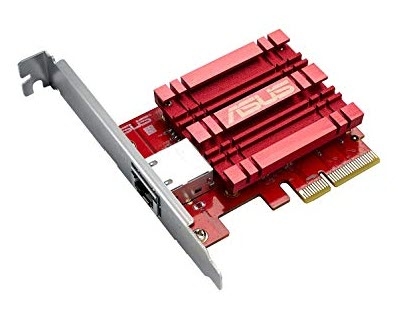
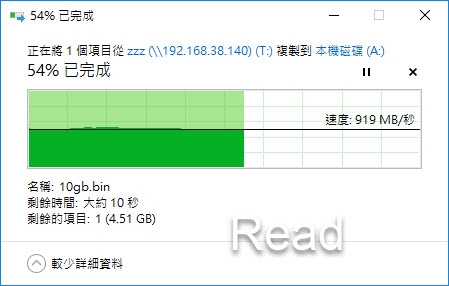
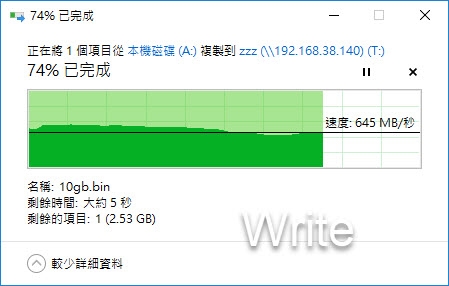
DS1618+ 裝上 E10G18-T1 10G 卡, 而 windows i5 PC 上面安裝 Asus XG-C100C, 中間經過一台 10G switch, 這樣的 windows 下大檔讀寫效能大約有 919MB/s & 645MB/s (NAS為 intel ssd*4 RAID6), 效能和一般電腦安裝 SATA SSD 差不多.