

1. 請按照79頁的大約流程,且PATH也要update(或者把下面這行加在backdoor裡重開機)
PATH=$PATH:/bin:/sbin:/usr/bin:/usr/sbin:/usr/local/bin:/usr/local/sbin
請特別注意,這些步驟執行前,請再次確認你有su過成為root了!!!!!!
或者你打 whoami ,可以顯示你現在的使用者身份
2. 修改 /etc/apt/sources.list
(不需要設成 testing/unstable的,照下面三行設就對了)
deb ftp://ftp.isu.edu.tw/pub/Linux/Debian/debian/ stable main contrib non-free
deb http://non-us.debian.org/debian-non-US stable/non-US main contrib non-free
deb http://security.debian.org/ sarge/updates main contrib non-free
3. 依序輸入下列指令來更新(過程中大多選Y,除了更新kernel時會要你作boot-image,該時不要選stop):
(下面的aptitude install subversion buildXXXX那行會被mobile01斷行,請注意)
apt-get update
apt-get upgrade
aptitude dist-upgrade
aptitude search kernel-image
aptitude install kernel-image-2.6.8-powerpc
aptitude install wget screen
aptitude install subversion build-essential libtool automake1.9 openssl libcurl3 libcurl3-dev libsigc++-2.0-0c2a libsigc++-2.0-dev libncurses5 libncurses5-dev
apt-get install rtorrent screen
4. 請按下面步驟一步步執行!!
cd /usr/src
svn co -r 1013 svn://rakshasa.no/libtorrent/trunk
REPOS=https://xmlrpc-c.svn.sourceforge.net/svnroot/xmlrpc-c/advanced
svn checkout $REPOS xmlrpc-c
cd /usr/src/trunk/libtorrent
./autogen.sh
./configure
make
make install
cd /usr/src/xmlrpc-c
./configure --disable-cplusplus
make
make install
cd /usr/src/trunk/rtorrent
./autogen.sh
./configure --with-xmlrpc-c
make
make install
成功後,rtorrent執行檔就會自動被產生至 /usr/local/bin中
5. 修改 --> vi /etc/rtorrent.rc (我習慣用vi,不習慣的就照前面大大教的用nano)
min_peers = 40
max_peers = 200
max_uploads = 10
download_rate = 0
upload_rate = 20 (<------特別注意,家裡頻寬不大不要設到180....設個20~30就很夠啦)
directory = /share
session = /tmp/rtorrent
schedule = watch_directory,10,10,load_start=/share/torrent/*.torrent
#schedule = tied_directory,10,10,start_tied=
#schedule = untied_directory,10,10,close_untied=
schedule = ratio,60,60,"stop_on_ratio=500,200M,1500"
port_range = 6890-6890 (跟底下的dht_port可以設成一樣的)
use_udp_trackers = yes
send_buffer_size = 1M
receive_buffer_size = 2M
encoding_list = UTF-8
dht = auto
dht_port = 6890
encryption = allow_incoming,enable_retry,prefer_plaintext
scgi_port = 127.0.0.1:5000
on_finished = move_complete,"execute=mv,-u,$d.get_base_path=,/share/done/ ;d.set_directory=/share/done/"
on_erase = move_complete,"execute=mv,-u,$d.get_base_path=,/share/done/"
6. 建立 torrent 暫存區
mkdir -p /tmp/rtorrent
mkdir -p /share/torrent
mkdir -p /share/done
7. 編輯"backdoor"增加如下幾行
if [ -e /mnt/debian/tmp/rtorrent/rtorrent.lock]; then
rm /mnt/debian/tmp/rtorrent/rtorrent.lock
fi
if [ -e /mnt/debian/usr/local/bin/rtorrent ]; then
/mnt/debian/bin/chroot /mnt/debian /usr/local/bin/screen -d -m /usr/local/bin/rtorrent -n -o import=/etc/rtorrent.rc
fi
ln -s /mnt/debian/share /mnt/Share/download
存檔後重新開機即可(要記得先打兩次"exit"離線)
ps.最後一行 ln -s /mnt/debian/share /mnt/Share/download 只需執行一次,之後,就可以將該行刪除了
所以重開完機要記得再編輯 backdoor把該行去掉
8. 下載東東 ( 將種子丟到網芳的 Share\share\download\torrent 內,rtorrent 就會自動下載 )
下載中的東西則會放在 網芳的 Share\share\Share\download裡
下載完的東西則會放在 網芳的 Share\share\Share\download\done裡
9. 關於使用ntorrent作GUI管理的部份,即便你通通設對,也是不能使用
為何呢? 很簡單,你用netstat看過就知道了,上頭的port 5000是開成local端的
也就是不對外開放,除非你登入debian並且裝了x-win之類的來run它,
這點可以透過修改rtorrent.rc裡的scgi_port來避掉
就是把 scgi_port = 127.0.0.1:5000 改成 scgi_port = :5000
但請注意,這麼一改,若你在編譯rTorrent及xmlrpc時,沒先把安全防護選項disable掉
它會造成你rTorrent無法執行
也就是/usr/local/bin/rtorrent -n -o import=/etc/rtorrent.rc之後會告訴你目前scgi_port不安全
所以強迫終止
所以,真的很需要nTorrent的人,請多研究一下rTorrent及xmlrpc的complier config先
不然就安份的使用rTorrent + DHT即可
PS1: 有站友問到的svn無法執行,請先確認你當時的使用者身份是root喔~~
PS2: rtorrent.rc裡的port_range及dht_port可以設成一樣(不同protocol)
但切記,家裡有設防火牆或是你NAS裝在router後面的,記得要去把這個port給打開通行


首先編譯前的準備工作前面文章大都有提到,有一部分我只稍微變一下
之前文章裡安裝 libncurses5 libncurses5-dev
我改變做法安裝 libncursesw5 libncursesw5-dev
我的原始碼下載步驟:
cd /usr/src
svn co -r 1013 svn://rakshasa.no/libtorrent/trunk
REPOS=https://xmlrpc-c.svn.sourceforge.net/svnroot/xmlrpc-c/advanced
svn checkout $REPOS xmlrpc-c
我的編譯&安裝步驟:
cd /usr/src/trunk/libtorrent
./autogen.sh
./configure --disable-debug
make
make install
cd /usr/src/xmlrpc-c
./configure --disable-cplusplus --disable-debug
make
make install
./autogen.sh
./configure --with-xmlrpc-c --disable-debug CPPFLAGS=-I/usr/include/ncursesw
make
make install
我的 backdoor 內容:
#!/bin/sh
if [ -d /mnt/debian ]; then
/mnt/debian/bin/chroot /mnt/debian /etc/rc3.d/S20ssh restart
if [ ! -e /mnt/debian/proc/cpuinfo ]; then
mount -t proc proc /mnt/debian/proc
fi
fi
if [ -e /mnt/debian/etc/rc.local ]; then
/mnt/debian/bin/chroot /mnt/debian /etc/rc.local
fi
產生 /etc/rc.local 檔案:
touch /etc/rc.local
chmod 755 /etc/rc.local
我的 /etc/rc.local 內容:
#!/bin/sh
export LC_ALL=zh_TW.UTF-8
export LANG=zh_TW.UTF-8
if [ -e /etc/init.d/lighttpd ]; then
/etc/init.d/lighttpd restart
fi
if [ -e /share/rtorrent/session/rtorrent.lock ]; then
rm /share/rtorrent/session/rtorrent.lock
fi
if [ -e /usr/local/bin/rtorrent ]; then
/usr/bin/screen -d -m -U /usr/local/bin/rtorrent -n -o import=/share/rtorrent/rtorrent.rc
fi
小小測試成果:

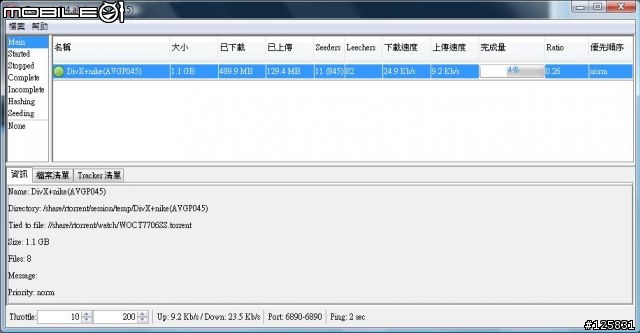

小弟自行摸索安裝完成no-ip for linux版本
但是不知道如何將 /usr/local/bin/noip2 這串執行指令寫入backdoor中
backdoor的語法我完全看不懂。所以想請教一下會的人麻煩教一下,感激不盡!

就卡住了
一直顯示 command not found
不知道是不是SVN也是要先安裝的軟體
希望有善心的大大可以幫忙解答
我似乎找到問題點
perl: warning: Falling back to the standard locale ("C").
locale: Cannot set LC_CTYPE to default locale: No such file or directory
locale: Cannot set LC_MESSAGES to default locale: No such file or directory
locale: Cannot set LC_ALL to default locale: No such file or directory
當執行安裝時
最後都會出現這個訊息
我參考其他教學直接安裝 apt-get install subversion
其中又出現這個訊息
所以主要應該是這個問題導致沒辦法執行
希望有善心的大大可以幫忙解答
找到原因 已經解決


但出現一個問題
相同的backdoor設定可是重開機後卻沒友執行rtorrent
分段測試發現無法執行的是
/mnt/debian .......
因為測試時發現nas不認得/mnt/debian 只能手動執行
手動執行後的訊息
(23:14:42) Using 'select' based polling.
(23:14:42) Ignoring ~/.rtorrent.rc.
(23:14:42) XMLRPC initialized with 390 functions.
(23:14:42) The SCGI socket is bound to a specific network device yet may still pose a security risk, consider using 'scgi_local'.
(23:14:44) Starting DHT server on port 30890.
screen -d -m /usr/local...........
不知是否因為前面已經執行過chroot的指令
if [ -d /mnt/debian ]; then
/mnt/debian/bin/chroot /mnt/debian /etc/rc3.d/S20ssh restart
if [ ! -e /mnt/debian/proc/cpuinfo ]; then
mount -t proc proc /mnt/debian/proc
#PATH=$PATH:/bin:/sbin:/usr/bin:/usr/sbin:/usr/local/bin:/usr/local/sbin
fi
fi
chmod 777 /tmp
if [ -e /mnt/debian/tmp/rtorrent/rtorrent.lock ]; then
rm /mnt/debian/tmp/rtorrent/rtorrent.lock
fi
#(0.6.4)if [ -e /mnt/debian/usr/bin/rtorrent ]; then
#/mnt/debian/bin/chroot /mnt/debian /usr/bin/screen -d -m /usr/bin/rtorrent -n -o import=/etc/rtorrent.rc
if [ -e /usr/local/bin/rtorrent ]; then
screen -d -m /usr/local/bin/rtorrent -n -o import=/etc/rtorrent.rc
fi
#ln -s /mnt/debian/share /mnt/Share/download
記得第一次安裝(0.6.4)時也發生過
但忘記是如何解決的
以上是最後測試的版本, 但還是無法自動執行
希望各位大大能幫忙看一下
後來測試幾次都無效後, 又把內容改回大大提供的.
神奇的事情發生了, 居然可以啟動了.
而且我其實是直接在舊版上升級, 並未重新格式化硬碟, 所以大家也可以照先進們提出的辦法試試看.
















內文搜尋