

請問大家
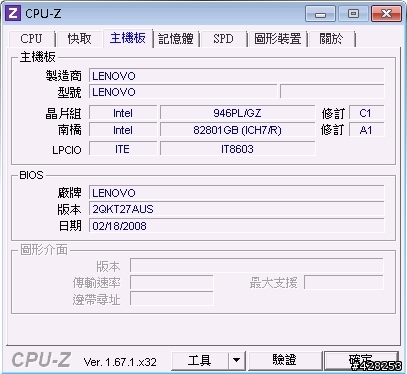
小弟在網拍上標到一台Lenovo(IBM)橫躺式主機,型號是ThinkCentre M55e (9644-A75)
但是開機時它會嗶嗶兩聲,接著出現「0167 no processor bios update found」, 雖然等待約5秒,它還是能進入XP,但小弟上網爬了很多文章,發現這個問題可能來自於處理器非原裝的,所以BIOS不認識它的型號才會出現這個錯誤碼,必須更新BIOS就能解決!
但問題來了,小弟已在Lenovo官網下載了BIOS檔「2qjy29usa」但更新時它一直出現「BIOS UPDATE FAILED! THERE IS NO CPU MATCH」,請問這個問題要如何解決???


2.在將在2qj929a.iso燒成光碟內會有開機檔。
3.在用光碟開機。
4.在用下列內容去更新。
Installing the package
======================
1. Close all open applications.
2. Insert the bootable CD into your CD-ROM drive.
3. Shutdown the computer.
4. With the CD still inserted in the CD-ROM drive, power on the
system.
5. The current BIOS level on the system is compared to that on
the flash update CD. If the levels are the same, or the
level on the CD is older than the ROM, a message is displayed
stating:
"BIOS ROM file is older than (or same as) BIOS ROM image.
Continue Anyway? (y/n)"
6. The update may take up to 2 minutes. Do not power off or
restart the system during this procedure!
7. Wait until you see a message stating that the update has
completed successfully.
8. Remove the CD from the CD-ROM drive.
9. Press Enter.
=========================
5.當然更新BIOS是有風險,
d3agto wrote:
1.上次我有台聯想的...(恕刪)
謝謝d3agto與幾位網友的回應

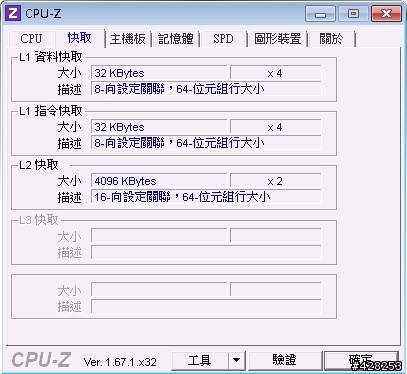
我原本也有下載USB版的BIOS更新檔,但在DOS下一樣會更新失敗,後來我在爬文過程找到大陸一個名叫BIOS之家的論譠,才發現原來一直更新失敗的問題在於BIOS更新檔裡沒有Xeon L5320這顆CPU的微碼,所以更新過程才會一直出現「BIOS UPDATE FAILED! THERE IS NO CPU MATCH」這個意思大概就是BIOS檔案裡沒有能與CPU匹配的型號,唯一的解決辦法只有用BIOS編輯軟體另外寫入這顆CPU的微碼,但我後來詢問過賣家,賣家說其實他們知道這個問題,也嘗試另外寫入微碼,不過這顆BIOS是比較舊的,容量不大,如果要另外加入微碼,就必須把其它的微碼刪掉,但是這會造成其它裝置發生錯誤,所以目前還是只能暫時這麼用了,只是還好,我這台主機是當小SERVER,平常開關機次數不大,偶爾聽它叫兩聲也就過了!!

再次感謝大家的幫忙!!

















內文搜尋
 從 APP 打開
X