

最近想要使用windows server 2012 R2去大量佈署未安裝作業系統的電腦
目標是做到全自動化不需要任何設定
時區 語言 硬碟分割 加入網域 登入 這些設定都不需要再一個一個手動輸入就可以完成
想要請問各位
我在2012R2安裝完成不屬服務後 新增了windows7的啟動映像檔以及安裝映像檔後
照理來說就可以使用PXE開機去手動慢慢一個一個設定
但是這樣不符合我的需求所以我使用windows AIK這套工具去打算全自動佈署安裝windows7這套軟體
程式部分我也匯出來了,但是不知道正不正確可不可以自動執行
因此我想請問各位有經驗的前輩
如果以我程式無誤的前提之下
我應該把程式放置在哪個位置?
(我現在是放置在切割出來專門放置不屬服務資料夾下的WDSclientunattend資料夾,名字叫做attend.xml)
不知道到這部分之前有什麼問題出現嗎?
然後就是server2012R2伺服器管理員>工具>windows佈署服務>伺服器>網域內容>用戶端>X64
這邊我想問的是我選擇的路徑應該是我WDSclientunattend資料夾下面的attend.xml檔案嗎?
還是別的路徑的?
我現在很煩惱不知道到底哪邊做錯了
當用戶端的電腦從DHCP拿到IP之後可以連線到sever2012抓取啟動檔跟安裝檔是沒有錯
但是卻不能自動執行
所以我再想是我程式哪裡有沒有設定好
又或者我在佈署服務或者AIK的部分沒有設定好
謝謝大家回答
我晚一點貼出我的AIK會區的程式給大家看一下
<unattend xmlns="urn:schemas-microsoft-com:unattend">
<settings pass="oobeSystem">
<component name="Microsoft-Windows-Deployment" processorArchitecture="amd64" publicKeyToken="31bf3856ad364e35" language="neutral" versionScope="nonSxS" xmlns:wcm="http://schemas.microsoft.com/WMIConfig/2002/State" xmlns:xsi="http://www.w3.org/2001/XMLSchema-instance">
<Reseal>
<Mode>Audit</Mode>
</Reseal>
</component>
<component name="Microsoft-Windows-Shell-Setup" processorArchitecture="amd64" publicKeyToken="31bf3856ad364e35" language="neutral" versionScope="nonSxS" xmlns:wcm="http://schemas.microsoft.com/WMIConfig/2002/State" xmlns:xsi="http://www.w3.org/2001/XMLSchema-instance">
<OOBE>
<HideEULAPage>true</HideEULAPage>
<ProtectYourPC>3</ProtectYourPC>
<NetworkLocation>Work</NetworkLocation>
</OOBE>
<OEMInformation>
<HelpCustomized>false</HelpCustomized>
</OEMInformation>
<ShowWindowsLive>false</ShowWindowsLive>
<TimeZone>Taipei Standard Time</TimeZone>
<UserAccounts>
<AdministratorPassword>
<Value>UABAAHMAcwB3ADAAcgBkAEEAZABtAGkAbgBpAHMAdAByAGEAdABvAHIAUABhAHMAcwB3AG8AcgBkAA==</Value>
<PlainText>false</PlainText>
</AdministratorPassword>
<LocalAccounts>
<LocalAccount wcm:action="add">
<Password>
<Value>UABAAHMAcwB3ADAAcgBkAFAAYQBzAHMAdwBvAHIAZAA=</Value>
<PlainText>false</PlainText>
</Password>
<Name>jasper</Name>
<Group>kitty</Group>
<Description>user1</Description>
<DisplayName>kittyuser1</DisplayName>
</LocalAccount>
</LocalAccounts>
<DomainAccounts>
<DomainAccountList wcm:action="add">
<Domain>kitty.roc</Domain>
<DomainAccount wcm:action="add">
<Name>john</Name>
</DomainAccount>
<DomainAccount wcm:action="add">
<Name>mary</Name>
</DomainAccount>
<DomainAccount wcm:action="add">
<Name>benny</Name>
</DomainAccount>
</DomainAccountList>
</DomainAccounts>
</UserAccounts>
<LogonCommands>
<AsynchronousCommand wcm:action="add">
<Order>1</Order>
<CommandLine>C:\Windows\System32\cmd.exe -command ping 127.0.0.1</CommandLine>
<RequiresUserInput>true</RequiresUserInput>
</AsynchronousCommand>
</LogonCommands>
<StartPanelLinks>
<Link0>%USERPROFILE%\AppData\Roaming\Microsoft\Windows\Start Menu\Programs\Accessories\Notepad.lnk</Link0>
</StartPanelLinks>
</component>
<component name="Microsoft-Windows-International-Core" processorArchitecture="amd64" publicKeyToken="31bf3856ad364e35" language="neutral" versionScope="nonSxS" xmlns:wcm="http://schemas.microsoft.com/WMIConfig/2002/State" xmlns:xsi="http://www.w3.org/2001/XMLSchema-instance">
<SystemLocale>zh-TW</SystemLocale>
<UILanguage>zh-TW</UILanguage>
<UserLocale>zh-TW</UserLocale>
<InputLocale>0404-00000404</InputLocale>
</component>
</settings>
<settings pass="windowsPE">
<component name="Microsoft-Windows-International-Core-WinPE" processorArchitecture="amd64" publicKeyToken="31bf3856ad364e35" language="neutral" versionScope="nonSxS" xmlns:wcm="http://schemas.microsoft.com/WMIConfig/2002/State" xmlns:xsi="http://www.w3.org/2001/XMLSchema-instance">
<SetupUILanguage>
<UILanguage>zh-TW</UILanguage>
</SetupUILanguage>
<InputLocale>0404-00000404</InputLocale>
<SystemLocale>zh-TW</SystemLocale>
<UILanguage>zh-TW</UILanguage>
<UserLocale>zh-TW</UserLocale>
</component>
<component name="Microsoft-Windows-Setup" processorArchitecture="amd64" publicKeyToken="31bf3856ad364e35" language="neutral" versionScope="nonSxS" xmlns:wcm="http://schemas.microsoft.com/WMIConfig/2002/State" xmlns:xsi="http://www.w3.org/2001/XMLSchema-instance">
<DiskConfiguration>
<Disk wcm:action="add">
<CreatePartitions>
<CreatePartition wcm:action="add">
<Order>1</Order>
<Size>50000</Size>
<Type>Primary</Type>
</CreatePartition>
</CreatePartitions>
<ModifyPartitions>
<ModifyPartition wcm:action="add">
<Active>true</Active>
<Format>NTFS</Format>
<Label>System</Label>
<Order>1</Order>
<PartitionID>1</PartitionID>
</ModifyPartition>
</ModifyPartitions>
<DiskID>0</DiskID>
<WillWipeDisk>true</WillWipeDisk>
</Disk>
<WillShowUI>OnError</WillShowUI>
</DiskConfiguration>
<ImageInstall>
<OSImage>
<InstallTo>
<DiskID>0</DiskID>
<PartitionID>1</PartitionID>
</InstallTo>
<InstallToAvailablePartition>false</InstallToAvailablePartition>
<WillShowUI>OnError</WillShowUI>
</OSImage>
</ImageInstall>
<UserData>
<ProductKey>
<WillShowUI>OnError</WillShowUI>
</ProductKey>
<AcceptEula>true</AcceptEula>
<FullName>john</FullName>
<Organization>kitty</Organization>
</UserData>
<Restart>Restart</Restart>
<ComplianceCheck>
<DisplayReport>OnError</DisplayReport>
</ComplianceCheck>
<EnableNetwork>true</EnableNetwork>
<UseConfigurationSet>true</UseConfigurationSet>
</component>
</settings>
<settings pass="specialize">
<component name="Microsoft-Windows-IE-InternetExplorer" processorArchitecture="amd64" publicKeyToken="31bf3856ad364e35" language="neutral" versionScope="nonSxS" xmlns:wcm="http://schemas.microsoft.com/WMIConfig/2002/State" xmlns:xsi="http://www.w3.org/2001/XMLSchema-instance">
<StartPages>
<StartPage wcm:action="add">
<StartPageUrl>www.yahoo.com.tw</StartPageUrl>
<StartPageKey>StartPage1</StartPageKey>
</StartPage>
</StartPages>
<Home_Page>tw.yahoo.com.tw</Home_Page>
</component>
<component name="Microsoft-Windows-Shell-Setup" processorArchitecture="amd64" publicKeyToken="31bf3856ad364e35" language="neutral" versionScope="nonSxS" xmlns:wcm="http://schemas.microsoft.com/WMIConfig/2002/State" xmlns:xsi="http://www.w3.org/2001/XMLSchema-instance">
<AutoLogon>
<Password>
<Value>UABAAHMAcwB3ADAAcgBkAFAAYQBzAHMAdwBvAHIAZAA=</Value>
<PlainText>false</PlainText>
</Password>
<Domain>kitty.roc</Domain>
<Enabled>true</Enabled>
<LogonCount>99</LogonCount>
<Username>john</Username>
</AutoLogon>
<ComputerName>kitty-PC1</ComputerName>
<TimeZone>Taipei Standard Time</TimeZone>
</component>
<component name="Microsoft-Windows-UnattendedJoin" processorArchitecture="amd64" publicKeyToken="31bf3856ad364e35" language="neutral" versionScope="nonSxS" xmlns:wcm="http://schemas.microsoft.com/WMIConfig/2002/State" xmlns:xsi="http://www.w3.org/2001/XMLSchema-instance">
<Identification>
<Credentials>
<Domain>kitty.roc</Domain>
<Password>P@ssw0rd</Password>
<Username>administrator</Username>
</Credentials>
<JoinDomain>kitty.roc</JoinDomain>
</Identification>
</component>
</settings>
<cpi:offlineImage cpi:source="wim:c:/users/jasper/desktop/waik/install.wim#Windows 7 ENTERPRISE" xmlns:cpi="urn:schemas-microsoft-com:cpi" />
</unattend>

感謝你的回文
我是想要用AIK做出一個回應檔去讓server可以執行WDS
使遠端電腦可以進行PXE開機網路全自動化安裝
至於塞程式的部份我暫時打算先放棄
我能力還不夠所以先不打算做到那部分
現在想先解決看看問題出在哪裡
我現在遇到的問題有幾個
1.AIK會出來的autoattend.xml程式我在方在哪一個資料夾下面?
我同時放在WDScliendattend資料夾跟映像資料夾
2.是不是要到server的WDS的伺服器內容>用戶端>勾選自動安裝並且選擇剛剛WDScliendattend資料夾下面的autoattend.xml檔案,還是要再安裝檔那邊的內容勾選自動安裝程式?
這邊我比較有疑問的就是不知道該怎麼把匯出來的程式如何跟server整合再一起去執行自動化程式
3.再來就是我這邊程式部分我不知道要怎麼做才好
我只能把AIK社說明書跟微軟論壇上面的切出來看一看
大概知道再說甚麼就去設定了...
再來就是觀看別人的操作~
所以才寫出這個...抱歉
我自己學的還不夠好 我會在去改一下看看到底要怎麼樣血才會自動化!!
感恩
感謝你的回文與建議
DHCP的部分我看過選項是只有設定好60 PXEClient的選項
但是我想這部分應該是沒有問題的
因為遠端電腦使用PXE開機時並沒有發生windows網頁所寫的問題
他可以正常地去使用install映像檔安裝
只是沒有像我寫的程式全自動化...
現在我寫的程式只有一小部分會自動化...(嘆氣
WDS Server上面的設定我比較有疑問,以下是我的設定
PXE回應 所有的電腦且不需要核准
開機 要求使用者按下F12才會進行啟動語跟裝(這部分我感覺比較好,不然到時候調整開機次序就可以了)
用戶端 啟用自動安裝,X64部分選取我匯出到WDScliendattend資料夾的xml檔案
xml檔案不知道是要取名unattend.xml還是autounattend.xml...網路上我看文章好像都有的樣子?
至於要不要在安裝映像的內容部分勾選自動安裝映像選取資料夾的部分就不太清楚了
畢竟查很多網頁...在內容的細項部分的細節都沒有人提到
開機的BOOT IMAGE跟安裝的INSTEALL IMAGE檔案都上去了
還有昨天程式的部分問題
我在前面的磁碟分割 語言 這部分沒辦法自動
至於後面的除了登入帳號錯誤之外其他應該都可以不用設定了
謝謝grathior
感謝你的回文
今天我又是了一下windows的佈署服務
已經確定了windows佈署服務是沒有問題的了
我有2個xml檔
一個是autounattend.xml,由伺服器的內容>用戶端部分選取x64去選擇(此檔案目前比較沒有問題)
我再再遠端安裝資料夾下的WDSClientattend資料夾
另外一個是OOBEattend.xml檔案,由安裝映像檔的內容溝選自動安裝映像去選擇
剩下有問題的就是AIK的程式的問題了
現在我遇到比較麻煩的問題就是以下幾點
所以想請問以下各位該怎麼設定比較好
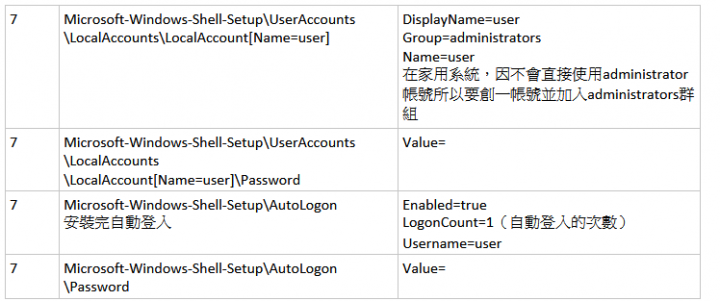
1.使用者建置的部份我建置了user但是卻不能夠用此帳號去登入?
2.administrator的帳號去登入之後系統顯示此帳號被停用!?(我第一次看到administrator帳號會被停用的情況)
3.登入後不能自動加入網域
以上幾點我都上過windows官方網站跟AIK的說明說找出來看了
也照著大致上做了
但是還是失敗...

網路上看別人做的感覺也跟我差不多
頂多就是帳號名字不同...
也不清楚在哪裡出現問題
我還在懷疑是不是程式的順序出現錯誤
有勞各位提點在哪裡錯誤我再去試看看

















內文搜尋