

存檔後並且執行它 在桌面下按F5重新整理後 就看的到消失的IE捷徑了
Windows Registry Editor Version 5.00
[HKEY_LOCAL_MACHINE\SOFTWARE\Microsoft\Windows\CurrentVersion\Explorer\Desktop\NameSpace\{00000000-0000-0000-0000-100000000001}]
@="Internet Explorer"
[HKEY_CLASSES_ROOT\CLSID\{00000000-0000-0000-0000-100000000001}]
@="Internet Explorer"
[HKEY_CLASSES_ROOT\CLSID\{00000000-0000-0000-0000-100000000001}\\DefaultIcon]
@="C:\\Windows\\System32\\ieframe.dll,-190"
[HKEY_CLASSES_ROOT\CLSID\{00000000-0000-0000-0000-100000000001}\\shell]
@=""
[HKEY_CLASSES_ROOT\CLSID\{00000000-0000-0000-0000-100000000001}\\shell\NoAddOns]
@="未安裝任何附加元件下啟動(&N)"
[HKEY_CLASSES_ROOT\CLSID\{00000000-0000-0000-0000-100000000001}\\shell\NoAddOns\Command]
@="\"C:\\Program Files\\Internet Explorer\\iexplore.exe\" -extoff"
[HKEY_CLASSES_ROOT\CLSID\{00000000-0000-0000-0000-100000000001}\\shell\Open]
@="開啟首頁(&H)"
[HKEY_CLASSES_ROOT\CLSID\{00000000-0000-0000-0000-100000000001}\\shell\Open\Command]
@="\"C:\\Program Files\\Internet Explorer\\iexplore.exe\""
[HKEY_CLASSES_ROOT\CLSID\{00000000-0000-0000-0000-100000000001}\\shell\Set]
@="內容(&R)"
[HKEY_CLASSES_ROOT\CLSID\{00000000-0000-0000-0000-100000000001}\\shell\Set\Command]
@="\"C:\\Windows\\System32\\rundll32.exe\" C:\\Windows\\System32\\shell32.dll,Control_RunDLL C:\\Windows\\System32\\inetcpl.cpl"
附加壓縮檔: Windows7 IE桌面捷徑.zip
測試圖
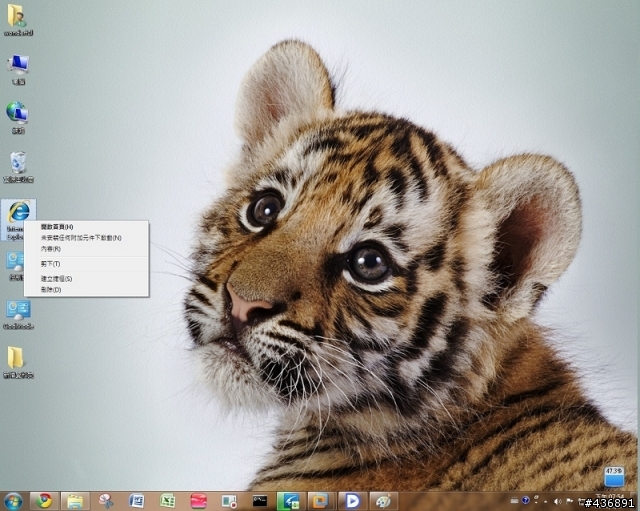
有人說之前用過不行 現在會懷疑是正常的
vista可用的登錄檔是長這樣
Windows Registry Editor Version 5.00
[HKEY_CURRENT_USER\Software\Microsoft\Windows\CurrentVersion\Explorer\HideDesktopIcons\NewStartPanel]
"{871C5380-42A0-1069-A2EA-08002B30309D}"=dword:00000000
這新的登陸檔是可以 右鍵選擇內容 (網際網路 內容)
(釘到工作列 或是開始的工作列都不能調 因為那是捷徑)
因為我的客戶要求 他就是習慣從桌面去調
剛好找到方法於是順便分享
有些人的windows XP更新至SP3後 IE圖示也消失不見 叫不回來
經過本人測試 這新的登錄檔 也適用
















