

只要準備一台PocketPC和衛星接收天線就能模擬成Garmin的機器規劃路線導航了(注:規劃路線需要有圖資支持才能用)
a)PocketPC 一台(本人測試的是Mio 168rs)
b)Garmin Que
下載後安裝在ppc
http://www.garmin.com/support/collection.jsp?product=010-00378-00
c)GpsGate
下載後安裝在ppc
http://franson.com/gpsgate/GpsGatePPC.zip
d)GpsProxy
下載後安裝在ppc
http://sourceforge.net/projects/gpsproxy/
e)PatchIMG
下載後安裝在PC
http://malsingmaps.com/modules.php?name=Downloads&d_op=getit&lid=24
f)國外Garmin圖資
http://mapcenter.cgpsmapper.com/
首先安裝Garmin Que,GpsGate和GpsProxy到PPC里(可以裝在SD卡內),
然後下載想要的圖資(img檔),然後用PatchIMG生成gmapsupp.img檔(增加img檔後,記得在Create gmapsupp.img打勾,
然後按SendMap鍵,最後把生成的檔放在ppc內Garmin的文件夾里.

再執行GPSgate,然後按setting,input選virtual port,com 0
output選virtual port,add virtual port com 7(Mio 168rs為例)
設定後記得再按open.

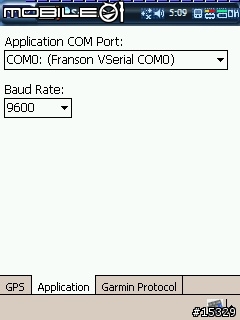
下一步再執行GpsProxy去tools -> setting,在GPS頁面GPS COM PORT選COM2: (Serial Cable on SP2)(Mio 168rs為例,其他機種用回原來的接收com port)
Baud Rate:4800,然後到Application頁面,在Application COM Port選COM 0,Baud Rate:9600,再按ok.
設定好一切去tools -> Start執行

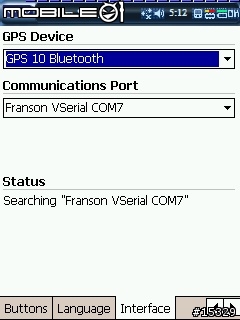
最後執行Garmin Que,去Menu -> System Setup ->Interface
在Communication port選COM 7.
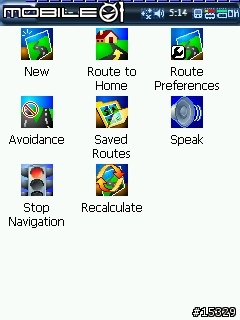
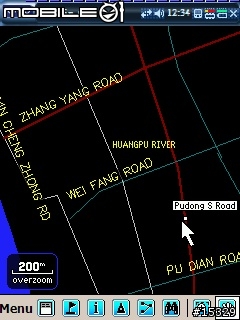
以下是Garmin Que的一些畫面



語音導航插件可在此下載
nRoute
http://www.garmin.com/support/collection.jsp?product=999-99999-10
(注:要有mapsource才能成功安裝nRoute)
快速的執行GpsProxy和Garmin Que的辦法
==============================
下載一個工具軟件MortRunner執行batch檔
http://pocketgear.com/software_detail.asp?id=13738
下載後打開記事本拷貝和儲存以下的指令,然後命名*.txt 去 *.mortrun
移這*.mortrun檔到 PPC內的\Windows\Start Menu\Programs
#mortrunner script
Run "\Storage card\GPSProxy\GPSProxy.exe"
WaitForActive "GPSProxy",10
MouseClick 10,315
Sleep 1000
MouseClick 13,240
Run "\Storage card\Garmin Que\GarminQue.exe"
Sleep 5000
MouseClick 13,240
試用後覺得非常棒,只是每次要執行都需先執行GpsGgate,GpsProxy然後才能執行Gamin Que.















