• 871

[研究所] MikroTik RouterOS 學習 (持續更新)

segabug wrote:
小弟今天從辦公室網路(恕刪)
gfx wrote:
(恕刪)


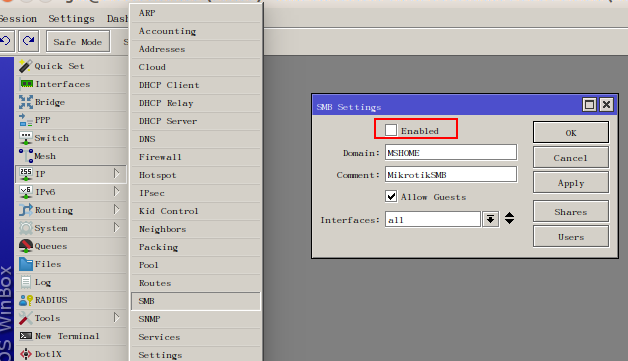
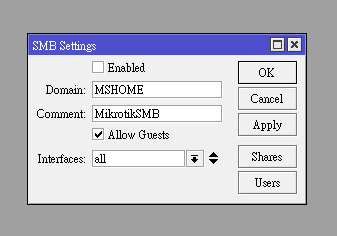
我的SMB選單跟你的設定一樣,
所以覺得怪,
才上來提問
請問有人知道如何用VLAN切出訪客網路嗎?
我有一台RB3011(hinet pppoe連線上網)
RB3011 port 2接了一台商用AP netgear WAC510
這台AP已經先設定好了兩個SSID介面
tagged 1733為訪客SSID,給訪客上網用(172.16.0.0/24)
untagged 1為內部人員使用SSID(192.168.4.0/24)
試了一下都不成功
能讓訪客網路取得訪客IP,但是無法連上網
目前無頭緒怎麼設定中...
segabug wrote:
我的SMB選單跟你的(恕刪)
不放心的話用防火牆禁止吧。
/ip firewall raw add action=drop chain=output protocol=tcp src-port=139
gfx wrote:
不放心的話用防火牆禁...(恕刪)

 我再來加加看,
感謝你的建議,
到時候在來用nmap來掃掃看加完後狀態
ouchwe wrote:
請問有人知道如何用VLAN...(恕刪)
假設rb3011 eth10與wac510連接:
/interface bridge
add name=bridge1

/interface bridge port
add bridge=bridge1 interface=ether2 hw=no
add bridge=bridge1 interface=ether3 hw=no
add bridge=bridge1 interface=ether4 hw=no
add bridge=bridge1 interface=ether5 hw=no
add bridge=bridge1 interface=ether6 hw=no
add bridge=bridge1 interface=ether7 hw=no
add bridge=bridge1 interface=ether8 hw=no
add bridge=bridge1 interface=ether9 hw=no
add bridge=bridge1 interface=ether10 hw=no
add bridge=bridge1 interface=sfp1 hw=no

/interface bridge vlan
add bridge=bridge1 tagged=bridge1,ether10 untagged=ether2,ether3,ether4,ether5,ether6,ether7,ether8,ether9,sfp1 vlan-ids=1
add bridge=bridge1 tagged=bridge1,ether10 vlan-ids=1733

/interface vlan
add interface=bridge1 vlan-id=1733 name=vlan1733

/ip address
add address=192.168.4.1/24 interface=bridge1
add address=172.16.0.1/24 interface=vlan1733

/interface bridge
set bridge1 vlan-filtering=yes

/ip pool
add name=lan ranges=192.168.4.2-192.168.4.254
add name=guest ranges=172.16.0.2-172.16.0.254

/ip dhcp-server
add address-pool=lan interface=bridge1
add address-pool=guest interface=vlan1733

/ip dhcp-server network
add address=192.168.4.0/24 gateway=192.168.4.1
add address=172.16.0.0/24 gateway=172.16.0.1

/ip dns
set allow-remote-requests=yes servers=168.95.1.1

/ip firewall nat
add action=masquerade chain=srcnat ipsec-policy=out,none out-interface=pppoe-out1 src-address-type=!local

/ip firewall raw
add action=drop src-address=172.16.0.0/24 dst-address=192.168.4.0/24
gfx wrote:
假設rb3011 eth10...(恕刪)


感謝gfx大大
忘了說RB0311 sfp1我拿來撥接pppoe了
目前是排除在bridge之外
這樣還要再把sfp1加入VLAN bridge中嗎?

另外RB3011的VLAN規則不是在switch VLAN底下操作嗎?
還是只能在bridge vlan底下操作嗎?
是不是跟交換晶片硬體限制有關?
這方面我有點霧沙沙
routeros VLAN設定感覺有點複雜...
ouchwe wrote:
感謝gfx大大請問RB3011...(恕刪)
可以用switch chip操作啊
rb3011可以用switch chip橋接,也支持援cpu橋接。

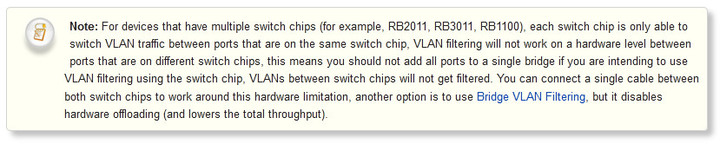
但rb3011有兩個switch chip,彼此又不能控制對方chip的port,
所以這兩個chip需必取其中一個port用實體線串起來(ether5<->ether6),
才算是真正的用switch chip串聯。


所以若vlan使用switch chip,您至少需準備兩個bridge:
bridge1:橋接ether2-ether5,還有sfp1。不啟用vlan。
bridge2:橋接ether6-ether10,啟用vlan。

/interface bridge
add name=bridge1 fast-forward=no protocol-mode=none
add name=bridge2 fast-forward=no protocol-mode=none

/interface bridge port
add bridge=bridge1 interface=sfp1
add bridge=bridge1 interface=ether2 hw=yes
add bridge=bridge1 interface=ether3 hw=yes
add bridge=bridge1 interface=ether4 hw=yes
add bridge=bridge1 interface=ether5 hw=yes
add bridge=bridge2 interface=ether6 hw=yes
add bridge=bridge2 interface=ether7 hw=yes
add bridge=bridge2 interface=ether8 hw=yes
add bridge=bridge2 interface=ether9 hw=yes
add bridge=bridge2 interface=ether10 hw=yes

/interface ethernet switch vlan
add ports=bridge2,ether10 switch=switch2 vlan-id=1733

/ip address
add address=192.168.4.1/24 interface=bridge1
add address=172.16.0.1/24 interface=bridge2

/interface ethernet switch port
set ether2 vlan-mode=disabled vlan-header=leave-as-is
set ether3 vlan-mode=disabled vlan-header=leave-as-is
set ether4 vlan-mode=disabled vlan-header=leave-as-is
set ether5 vlan-mode=disabled vlan-header=leave-as-is
set ether6 vlan-mode=secure vlan-header=leave-as-is
set ether7 vlan-mode=secure vlan-header=leave-as-is
set ether8 vlan-mode=secure vlan-header=leave-as-is
set ether9 vlan-mode=secure vlan-header=leave-as-is
set ether10 vlan-mode=secure vlan-header=leave-as-is
set switch1-cpu vlan-mode=disabled vlan-header=leave-as-is
set switch2-cpu vlan-mode=secure vlan-header=leave-as-is default-vlan-id=1733

/ip pool
add name=lan ranges=192.168.4.2-192.168.4.254
add name=guest ranges=172.16.0.2-172.16.0.254

/ip dhcp-server
add address-pool=lan interface=bridge1
add address-pool=guest interface=bridge2

/ip dhcp-server network
add address=192.168.4.0/24 gateway=192.168.4.1
add address=172.16.0.0/24 gateway=172.16.0.1

/ip dns
set allow-remote-requests=yes servers=168.95.1.1

/ip firewall nat
add action=masquerade chain=srcnat ipsec-policy=out,none out-interface=pppoe-out1 src-address-type=!local

/ip firewall raw
add action=drop src-address=172.16.0.0/24 dst-address=192.168.4.0/24
ouchwe wrote:
感謝gfx大大忘了說RB0311...(恕刪)


我覺得routeros就是難在這邊
有很多細節要注意
也是有趣在這邊
可以很自由化的設定
感謝您提供的方法
我來試試看
謝謝!
gfx wrote:
172.16.0.0/24

gfx我成功了!
不過我是用比較簡略的方法
在interface中新增一個VLAN
add interface=ether10 name=VLAN 1733 vlan-id=1733
然後把DHCP server指向這個VLAN介面
就可以了!
但是不知道這樣的方法有甚麼差別?
  • 871
內文搜尋
X
評分
評分
複製連結
請輸入您要前往的頁數(1 ~ 871)
Mobile01提醒您
您目前瀏覽的是行動版網頁
是否切換到電腦版網頁呢?